A field guide to the CrazyGames build
How a run works
Seven things happen before the game asks you to do anything — and one of them is skippable. This is that order, recorded on 2026-11-06.
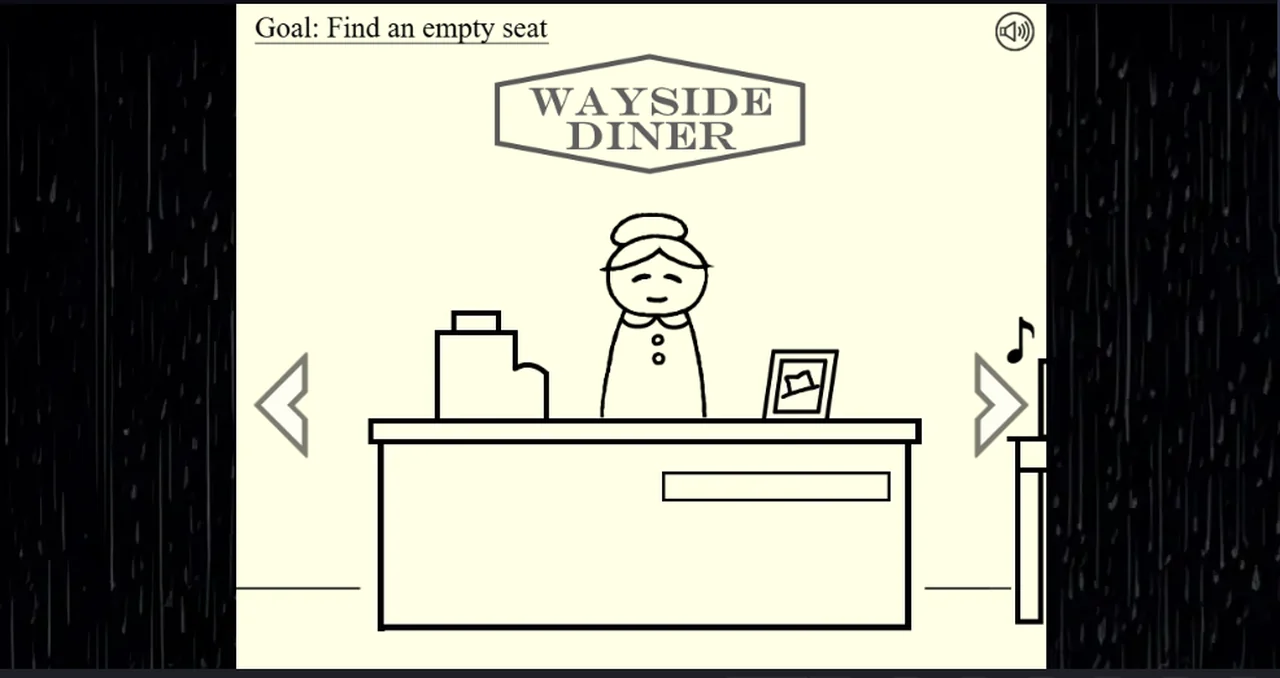
The order the client puts things in
| step | what you see | what it does |
|---|---|---|
| 1 | the title screen: a stick-figure trucker at the wheel, BEGIN, CREDITS, and an ACHIEVEMENTS tab | BEGIN starts a run |
| 2 | a black screen with the CrazyGames loading mark | the build loads; on our first load this took about eight seconds |
| 3 | DRIVING... printed over the same truck, with a progress bar under it | the intro is running; the bar fills on its own |
| 4 | rain, the trucker's face, then an animatic of you walking to the door with three silhouettes inside | the story's opening |
| 5 | the Wayside Diner counter and a dialogue box | Maggie speaks first |
| 6 | Goal: Find an empty seat, top left | the story tells you what it wants |
| 7 | grey arrows at the left and right edges | they move you along the diner |
The opening can be cut short. During the animatic the client prints
CLICK TO SKIP INTRO along the bottom right of the frame, and clicking on that
text jumps to the animatic's next beat rather than to the diner. Two clicks of
ours landed on the canvas elsewhere and did nothing.
Maggie's first line, word for word:
“Come on in honey, and close the door behind you. Lord knows the rain ain't gonna let you get any further tonight.”
The dialogue box advances with the arrow inside it, or with Space and Enter. The world does not move while a line is on screen, and nothing is timed.
The goal line is the client's own to-do list
Goal: Find an empty seat is not a tutorial popup you dismiss. It sits in the
top-left corner of the frame, it changes as the story moves, and it is the only
place the game states an objective. In the first screen it is the only text on
screen that is not dialogue.
We have seen it on the opening screen only. Whether it stays visible in every room is something the next session has to record.
The room is wider than the screen
The diner is not one picture. The grey arrows at the screen edges step you through it, and the objects on screen are the controls:
- the counter, with Maggie behind it
- a small table carrying a radio
- a red booth with a guest in it
Clicking the radio opens a close-up, which is how you tune it. That close-up is on its own page: the radio.
What we have not done from here
- finished a run (no ending screen yet)
- read the
ACHIEVEMENTSscreen's contents - opened the shed, the back door or the gravestone
- tested whether Space and Enter do exactly what the arrow does
Those are marked as untested on this page on purpose: a run is the only way to answer them, and this guide writes down the difference between what it has seen and what it has been told.
Last checked against the client: 2026-11-06 · client web build 2026-11-06