A field guide to the CrazyGames build
How the client tells you something is clickable
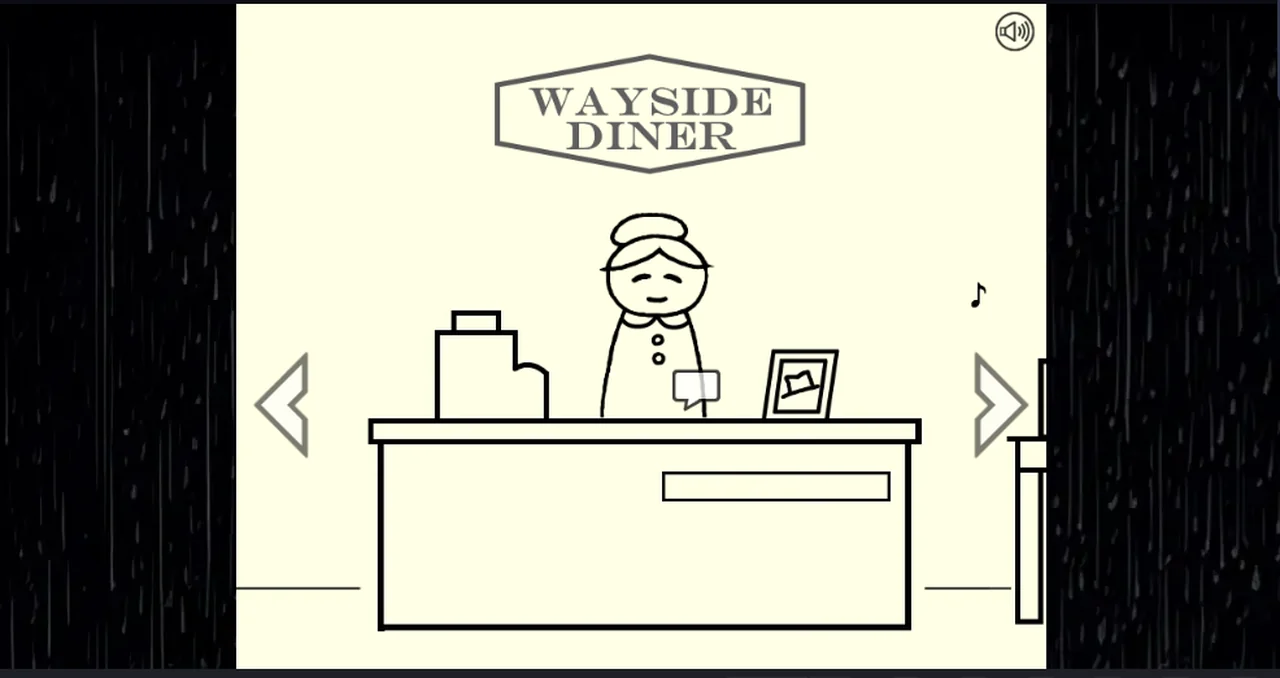
There is no pointer change anywhere in this build. What the client does instead is draw a small speech-bubble glyph over whoever you are allowed to talk to, and it only appears while the pointer sits on them.
What we tested
We parked the pointer on every object on the first screen in turn and took a frame each time, then compared the frames with the game area cropped out of the page around it. The page around the canvas advertises, and those banners change on their own, so any comparison that includes them is noise.
Three things came back:
| pointer is over | what changes |
|---|---|
| Maggie | a small speech-bubble glyph appears at the counter edge |
| the left or right edge arrow | that arrow lights up |
| the frame on the counter, the cup, the drawer | nothing we could measure |
The glyph is not decoration. Clicking it opens Maggie's dialogue — the same box you get by clicking her directly. Clicking beside it, with the glyph still on screen, does nothing.
Why the distinction matters
A guide that says “click Maggie” is only half true: you click the glyph, or you click her, and both work, but the glyph is the only thing on the screen that tells you she is interactive. The two booth guests behave the same way when you hover them, which is how the page on the booths was able to find them at all.
Nothing else advertises itself. The radio opens on a click but shows no glyph, and the counter objects show nothing either — the glyph appears to be reserved for people.
Not tested
- Whether the glyph appears for every character or only for some.
- Whether it changes when a character has nothing new to say.
- Whether touch input gets an equivalent cue, since we only ran a desktop browser.
- Whether the glyph has a name in the game's own text; we never saw a label for it.
Last checked against the client: 2026-11-06 · client web build 2026-11-06